I am what you might call an OG backup and recovery professional. For nearly 25 of my 35 years working in the Information Technology industry, I have had primary responsibility for managing and overseeing the backup and recovery solution. This goes all the way back to tapes and tape libraries up to more modern cloud-based products. What I am noticing is an administrator culture that seems to have forgotten the age time-tested, proven, best practices of backup in the 3-2-1 strategy.
If you are not familiar with this strategy, what 3-2-1 means is the following:
- 3-copies of the data
- 2-different media types
- 1-Off site backup
Many years ago, in the days before high-speed internet, the offsite copy usually involved either an administrator or a vendor taking a copy of the tape backup offsite. While recovery from tape was slow, it was still better than losing critical data. As the overall Internet improved, and speeds between locations increased, organizations started sending copies of their data to another location. At one former organization where I worked, we used a product called “HandyBackup”, that made a local disk copy of all backups, then replicated that to a matching server at a site in another state, on top of also having a tape backup. Each office was set up this way, where one office had a HP tape library, a system running HandyBackup as a fast local restore, then replicating to another HandyBackup server at a remote site. There were multiple copies and multiple ways to recover data. Granted, all of this was in the days before Cloud, AI, and ransomware.
Today, a lot of organizations have either moved 100% to cloud-based infrastructure or a hybrid of both on-premises and cloud-based infrastructure. However, there does seem to be a push to repatriate a lot of the data back on-premises with either cloud cost or a move to Private AI using products like Broadcom’s VMware Cloud Foundation 9.x. In any of these cases, backups seem to be less protected even as they have become more of a target for threat actors. Below are some examples.
- Cloud-based data loss
- In 2011, and AWS outage was the first incident of major customer data loss for a cloud provider
- May 2024, Google accidentally deleted the entire cloud account of an Australian pension fund
- AI Related data loss
- June 2025, an AI powered coding tool wipes out a companies database, then acknowledges the mistake: https://fortune.com/2025/07/23/ai-coding-tool-replit-wiped-database-called-it-a-catastrophic-failure/
- March 2026 – a single API command basically deletes an entire company database and backups via a single API command: https://www.penligent.ai/hackinglabs/ai-agent-deleted-a-production-database-the-real-failure-was-access-control/
- April 2026, a Claude-powered AI agent deleted an entire company and backups in nine seconds as well as all backups except for one that was over 3 months old, and then acknowledged it has ignored all guidelines: https://fortune.com/2025/07/23/ai-coding-tool-replit-wiped-database-called-it-a-catastrophic-failure/
These are just some samples of unintentional data loss, but each year, threat actors ransom, steal, and lock customers out of systems to get them to pay a ransom. Backups are a primary target for deletion in these cases as well. However, these actions are intentional and not accidental. This is where both air-gapped and immutable backups can ensure an organization can restore their environments if necessary.
Now, asking any technology professionals which is the best backup product can create a major debate. The product that is best for one organization may not be the best option for another one. I wrote an article posted on Experts-Exchange a few years ago on how to select the best backup solution for your organization. To check it out, see the link below:
However, as an old school backup and recovery guy, I am a fan of dedicated backup and recovery appliances. This keeps the backup management and storage totally separate from rest of the production environment. In addition, that appliance should have the ability to keep the backups encrypted and immutable. Immutable means they cannot be deleted or changed by anyone until a preconfigured retention period expires. Some products offer immutability, but the management platform is software that must be installed either on a physical or virtual server. The issue I have with these products is that if your environment is compromised or ransomed, you must get your management system(s) restored and working before you can start recovery. This will cause a recovery delay that I feel is unnecessary in the event of a disaster. In addition, products that are 100% cloud, in my opinion, could cause a slow recovery depending on your Internet speed. The following are simply my recommendations based on over two decades working on backup and recovery environments.
On-Premises Environments
There are numerous products and services available for on-premises backup and recovery. For this example, I will be discussing the Cohesity Data Protection Platform. Here are several reasons I like this platform:
- Immutable backup
- Dedicated appliance
- MFA access authentication
- Compatible with VMware, Hyper-V, etc.
- Cloud platform allows central management console for both on-premises and cloud products
- Independent, local management interface
For the below example, there would be a Cohesity Appliance cluster located at the primary data center. This appliance will initiate all backups and apply the configured retention period. Typical and time-tested retention periods for backups are to keep daily backups for 30 days, monthly backups for 1 year, and yearly backups for 7 years (based on compliance needs). Once the backup has been taken, there is a schedule that replicates the changed and newly backed up data to the peer appliance located at a disaster recovery site.
On another schedule, the data is then replicated our to the Cohesity Fort Knox Cloud instance as an air-gapped solution. There is a way in the portal for connectivity to only be open for preset time to allow for the data replication.
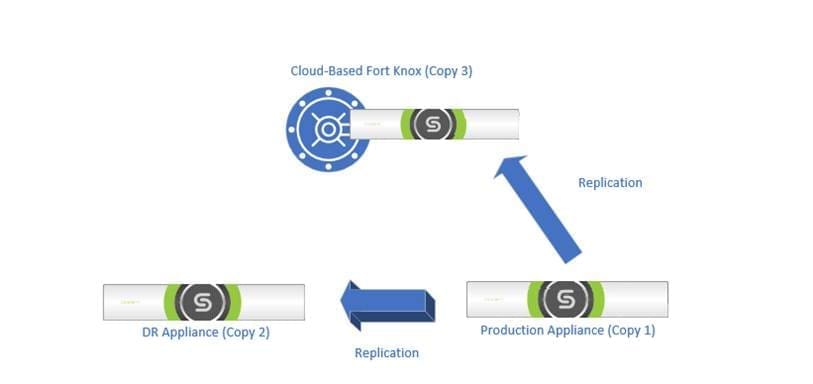
Using Cohesity Fort Knox has several advantages. First, the threat actors cannot get infrastructure access to your backups. This prevents them from making changes like “data jumps” that can impact immutability on physical appliances if they get root access. Second, there is a setting where there is no external access to these backups except during set time periods, essentially air-gapping them. Third, data restoration requires a majority approval from a preset quorum of individual. Fourth, the vaulted data can be scanned for malware and indicators of compromise to ensure your data is clean and safe. Finally, Fort Knox provides anomaly detection in the event of a massive change in the files or types of files backed up by a system. Overall, this platform enables clean and safe data.
Cloud-Based Environments
Today, many new organizations start with all their infrastructure in cloud-based, SaaS platforms. Others have migrated at least some of their data to cloud. Most of the time this comes in the form of moving from something like Exchange or SharePoint on-premises to M365. Unfortunately, most organizations feel that once they are a SaaS platform, they do not really have to worry about backups. Nothing could be further from the truth. Originally, Microsoft’s own documentation stated that the customer was responsible for backing up their data and that Microsoft was not responsible for lost data. Today, Microsoft does offer a backup solution for M365 now, but it is limited to a 1-year retention period as of this writing. Other vendors may have started similar offerings but trusting all of your backup date to be retained on the same platform as your production data is a risk in and of itself. What happens if, say in the case of the Australian pension plan, the entire tenant is inadvertently deleted?
Today, there is something new to consider, AI. For the last several years, AI has been on the rise. At the 2025 Microsoft Ignite conference and others, AI was the predominate theme. Including all the “great and time saving tasks” that could be completed by AI Agents. With that, many organizations have been rushing to implement AI Agents within their environments to save time, and increase automation, to improve overall operability. This rush has caused either a lack of awareness or consideration on all of the power these Agents may be given. Hence, there has been significate organizational data loss. Even when given guardrails, the AI’s have occasionally ignored those and proceeded. These can have the ability to wipe entire organizations off the map. Once again, this is where a product like Cohesity’s Cloud Protection Service can keep an organization’s backups safe. It works like the on-premises appliances, except it connects to supported SaaS platforms like M365 via API keys. The Cloud Protection Service pulls a copy of the data from the SaaS platform, which prevents any accidental deletion by any integrated AI Agent or data loss due to some catastrophic failure withing the providers infrastructure. As of this writing, while it does still provide the option to add a data lock to the backup, it does not have the ability to replicate to the Fort Knox platform. However, there is the option to configure a secondary archive location as an additional layer of protection.
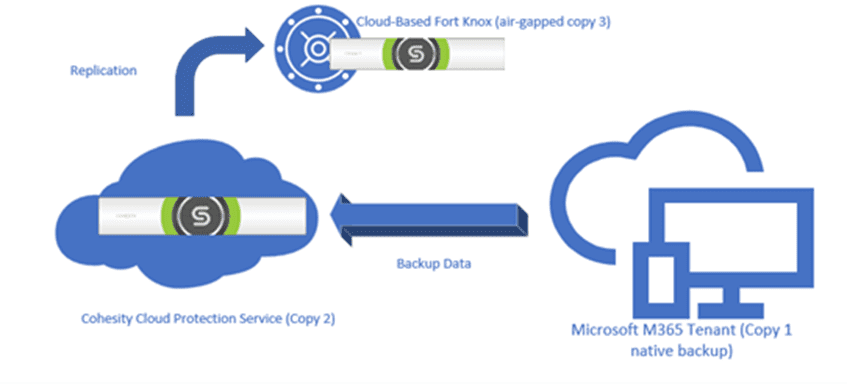
So, for any organization who feels that they have data stored in the cloud, so there is no reason to have third party, external backup solutions, now may be the time to reconsider. Especially if you are moving towards more automation with AI Agents. While these can be very useful and efficient at automating tasks, they can also be very destructive. Also, there have been instances of SaaS provides either having catastrophic failures or having taken unintentionally actions that destroyed customer data. Having a separate and isolated backup copy of your data is essential. Now is the time to re-evaluate your current data protection plan. Take appropriate action now, before something happens and none of your organization’s data can be recovered.

Leave a Reply